When you deploy a Storage account, a Key Vault or any other PaaS service, by default they’re reachable over the public internet. While protected by authentication and firewall rules the traffic still traverses Microsoft’s public endpoints and the internet. For many organisations, especially those with compliance requirements or a zero-trust security posture, that’s not acceptable.
Enter Private Endpoints.
Private endpoints are one of the most impactful networking features within Azure, once you understand how they work you’ll wonder how you ever lived without them.
The problem they solve
Consider a VM hosted in Azure that needs to read files from a storage account. Without a private endpoint, the VM’s traffic leaves the vNet in which the VMs NIC is attached and hits the public IP of yourstorageaccount.blob.core.windows.net.
This creates a few issues:
- Attack surface — the service is reachable from anywhere on the internet, relying on auth and firewall rules as the only protection.
- Data exfiltration risk — outbound traffic to storage goes to a public endpoint, making it harder to lock down with egress controls.
- Compliance — frameworks like PCI-DSS, ISO 27001, and NHS DSPT often require that sensitive data never traverse public networks.
What is a Private Endpoint?
A private endpoint is a network interface with a private IP address inside your vNet mapped to a specific Azure PaaS resource. Imagine it just like the NIC on a VM.
When you create a private endpoint for your storage account, Azure allocates a private IP in your chosen subnet and associates it with your storage account. Traffic from within your vNet to that IP goes directly to the storage account over the Microsoft backbone, no longer traversing the internet.
Once you’ve confirmed your PaaS resource is available over its private endpoint you can disable the public endpoint on the storage account, making it completely unreachable from the internet.
Private DNS — the piece everyone forgets
Here’s the part that trips people up. After creating a private endpoint, if you resolve yourstorageaccount.blob.core.windows.net from inside the vNet you’ll still get the public IP.
Azure handles this with private DNS zones. When you create a private endpoint, Azure can automatically create a DNS record in a private DNS zone linked to your vNet:
| Service | Private DNS Zone |
|---|---|
| Azure Blob Storage | privatelink.blob.core.windows.net |
| Azure SQL Database | privatelink.database.windows.net |
| Azure Key Vault | privatelink.vaultcore.azure.net |
Without a private DNS zone, name resolution from inside the vNet still returns the public IP:
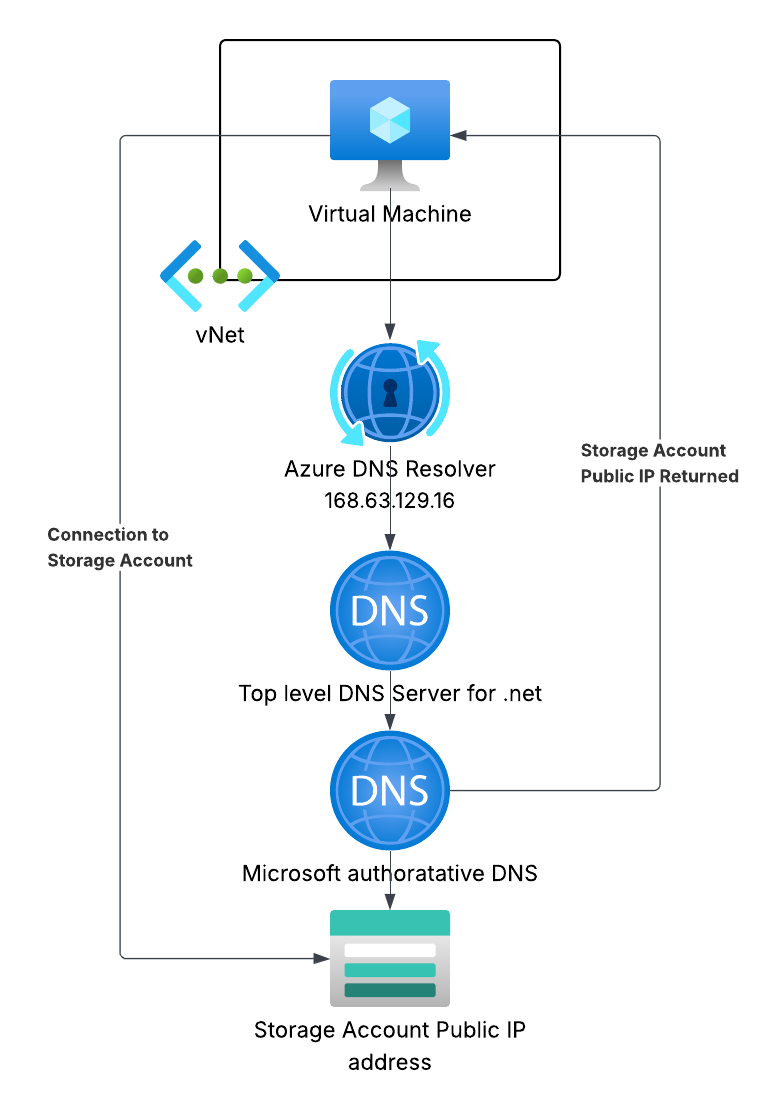
The DNS zone contains an A record which maps your storage account’s hostname to the private IP. When a VM in the linked vNet resolves yourstorageaccount.blob.core.windows.net, it gets the CNAME yourstorageaccount.privatelink.blob.core.windows.net, which the Private DNS Zone resolves to the private endpoints IP address.
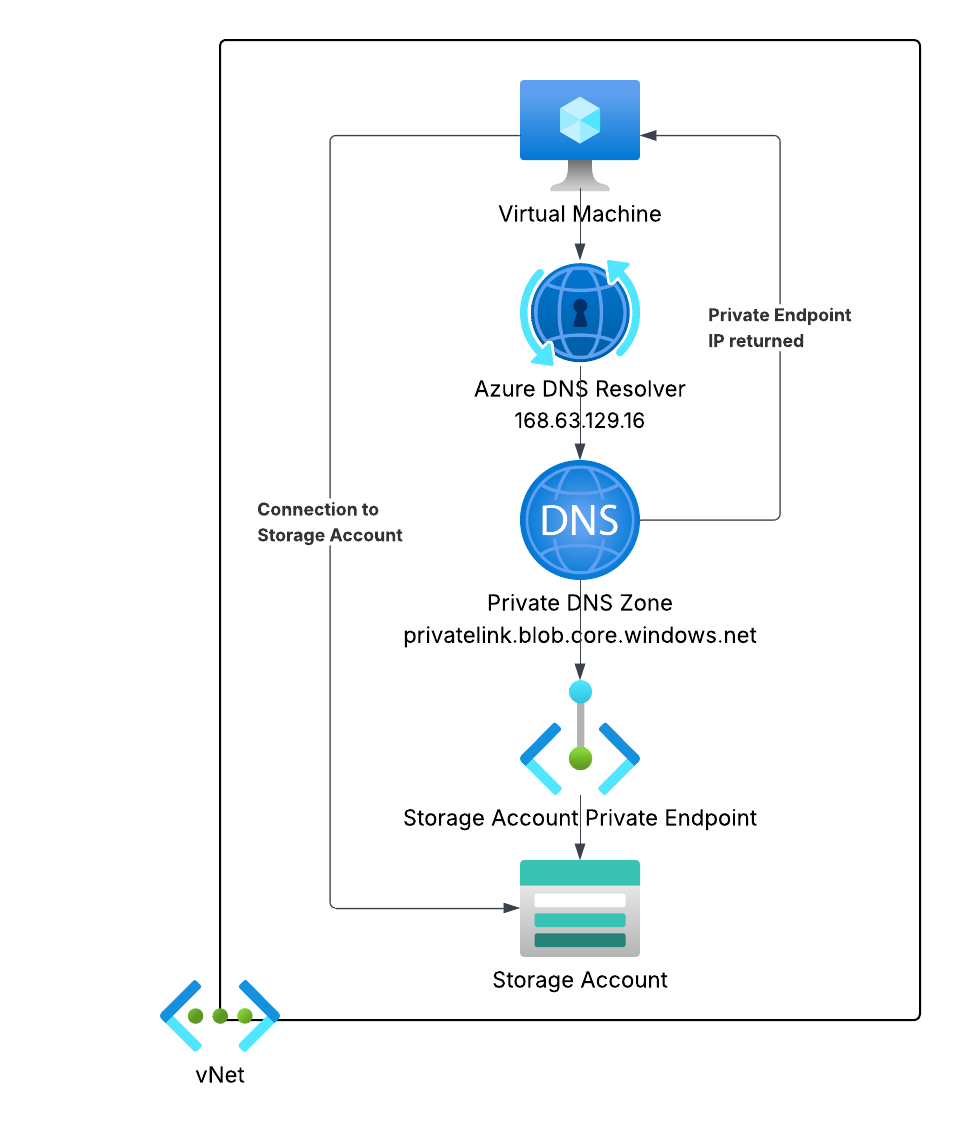
From outside the vNet, the same hostname resolves to the public IP as normal. The magic is that vNet-linked DNS zones take precedence for resources inside the vnet.
Important: If you’re using a hub-and-spoke topology with centralised DNS, you need to link the Private DNS Zones to the hub vNet — not just the spoke. Otherwise your spoke VMs, routing through the hub’s DNS, won’t get the private IP responses.
When to use them
Private Endpoints make sense whenever:
- You have PaaS services that should only be reachable from within your network - databases, Key Vaults, storage.
- You’re operating in a regulated environment - financial services, healthcare, government.
- You use a hub-and-spoke or Azure Virtual WAN topology - Private Endpoints integrate neatly with centralised egress and DNS.
- You want to disable public access entirely - pairing a Private Endpoint with
publicNetworkAccess: Disabledon the resource gives you the strongest posture.
They’re less necessary for public-facing services (App Services, API Management front-ends) or dev/test environments where the overhead isn’t justified.
Common gotchas
1. NSGs on the Private Endpoint subnet
Network Security Groups apply to Private Endpoint NICs from API version 2021-02-01 onwards, but you need to explicitly enable it on the subnet, prior to this, NSG rules were silently ignored on Private Endpoint subnets, which confused a lot of people.
2. Cross-region Private Endpoints You can create a private endpoint in a different region from the target resource. Traffic still stays on the Microsoft backbone, but latency will be higher than a same-region deployment.
3. Approval workflows
If the target resource is in a different subscription or tenant, the private endpoint connection needs to be manually approved by the resource owner. You can automate this with autoApproval policies in Azure policy if your organisation controls both sides.
4. Cost Private endpoints aren’t free - at time of writing they’re around £5–6/month per endpoint plus a small per-GB data processing charge. For production workloads this is negligible, but worth bearing in mind if you’re creating many of them.
Summary
Private endpoints are the right way to connect to Azure PaaS services from within a vNet. They replace a public internet hop with internal connectivity, they allow you to disable public access entirely, and integrate cleanly with private DNS zones for seamless name resolution. The DNS configuration is the fiddly bit, get that right and the rest is straightforward.
If you’re building anything resembling a production landing zone, private endpoints should be part of your standard pattern from day one.
Discussion